Track your stock as it is bought, manufactured, stored, and used
Built with Visual Studio .NET Framework and SQL Server Database
Our integrated stock system manages unlimited, multi-currency warehouses, dynamic pricing, and real-time
inventory. It seamlessly handles invoicing, orders, and aging reports. Comprehensive sales analytics
provide detailed insights across all business dimensions.
Seamlessly connects all accounting modules for unified financial management
Manage multiple companies and consolidate financial data effortlessly
Handle transactions in multiple currencies with automatic exchange rate calculations
Advanced access control and user permission management
Create, delete, modify, and search entries with intuitive mouse and keyboard navigation
Generate reports on both printer and screen with customizable formats
Available in Arabic, French, and English versions
Unlimited users with role-based permissions and password management
Manage unlimited, multi-company warehouses with comprehensive codification. Handle multi-currency pricing, dynamic selling rules, and real-time inventory tracking. Generate detailed reports for stock values, landed costs, and daily entries
This module enables the generation of a unique barcode for every inventory item and provides tools to print these barcodes on labels for efficient tracking and identification
Create multi-currency invoices and track daily global and detailed sales values
Manage supplier and customer orders with grouping, multiple deliveries, and payment scheduling. Track pending orders and integrate data into cash flow
Monitor aging reports for both client and supplier invoices
Analyze sales quantities and values by key parameters such as supplier, client, item, group, and salesperson
Ready to explore the features? Continue to the next sections to see the system in action.
Foundation modules for setting up and managing your Stock System structure
See how to set up Items,
accounts, and Operation types
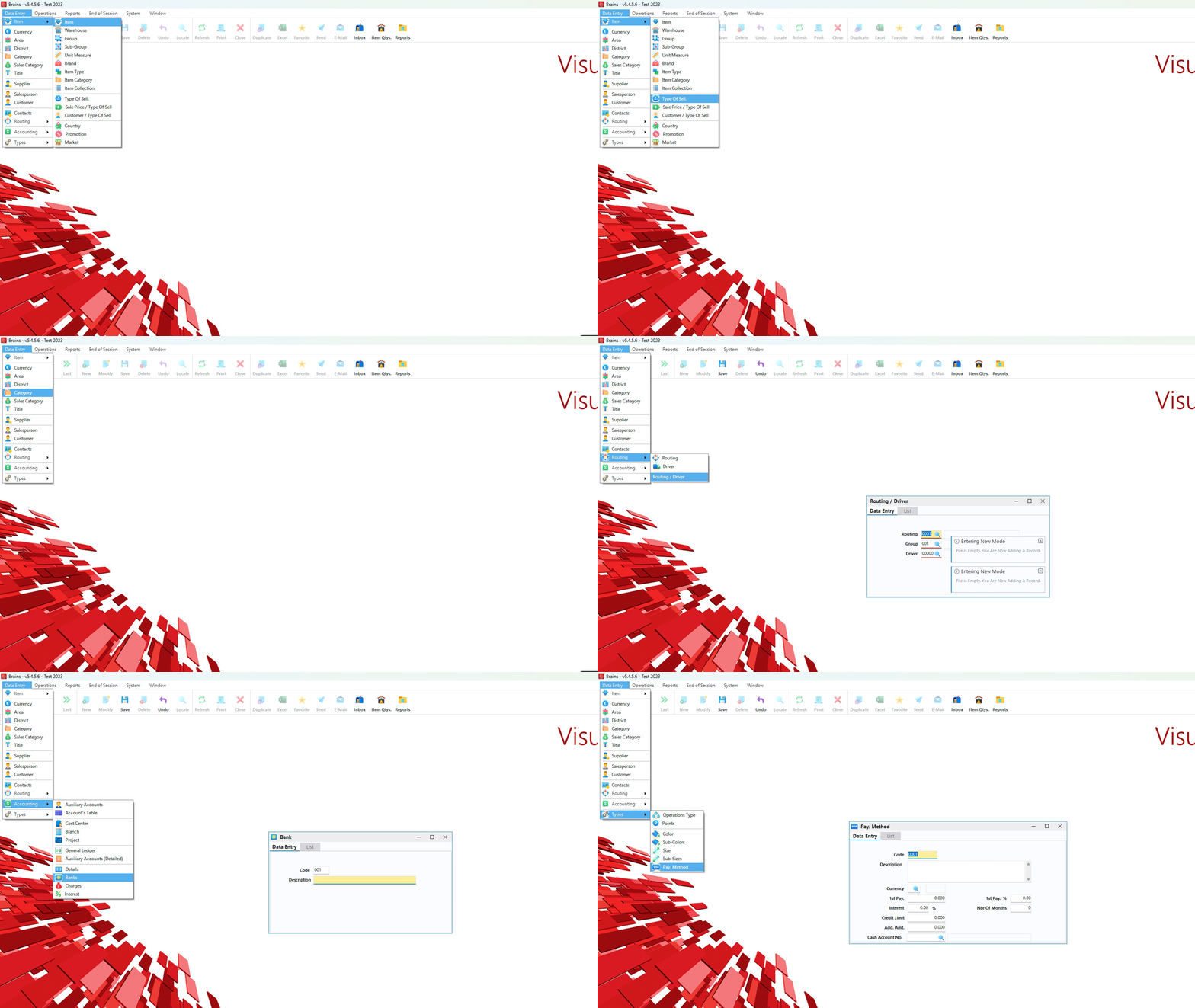
Input currency codes, descriptions, and symbols for all transactions
Create and manage government-recognized accounting chapters
Manage data related to the general ledger accounts
Show total account numbers with auxiliary codes
Define different Operation types (bank, journal, credit/debit notes)
This module creates all item parameters such as group, subgroup, supplier, unit measure, etc...
It allows the user data such as code and description related to the group section.
Same as the previous module except that the data entered is related to the sub-group which is in turn related to specific group.
It creates the unit measurement that is used in a specific company such Kilo, Box, Meter, etc...
It creates a file in which all information about suppliers are stored
This module allows you to input the codes of the different currencies you may deal with, their descriptions as well as their symbols
This module creates the codes of different area
This module specifies the various districts located under a certain area.
This module is used to classify the company's clients. This is used later for statistical reports.
This module creates the type of sales for every customer such as whole sale and retail.
This module allows you to enter the required data about the salespersons in the company.
This module allows you to enter the required data about the customers of the company.
This module differentiates the goods between one warehouse and another.
This module allows you to enter the type of an item such as normal, with expiry date etc...
This module allows you to enter all charges with their currencies so they could be used to calculate the landed cost of items.
Daily transaction processing and financial operations management
See daily transaction processing
and financial operations
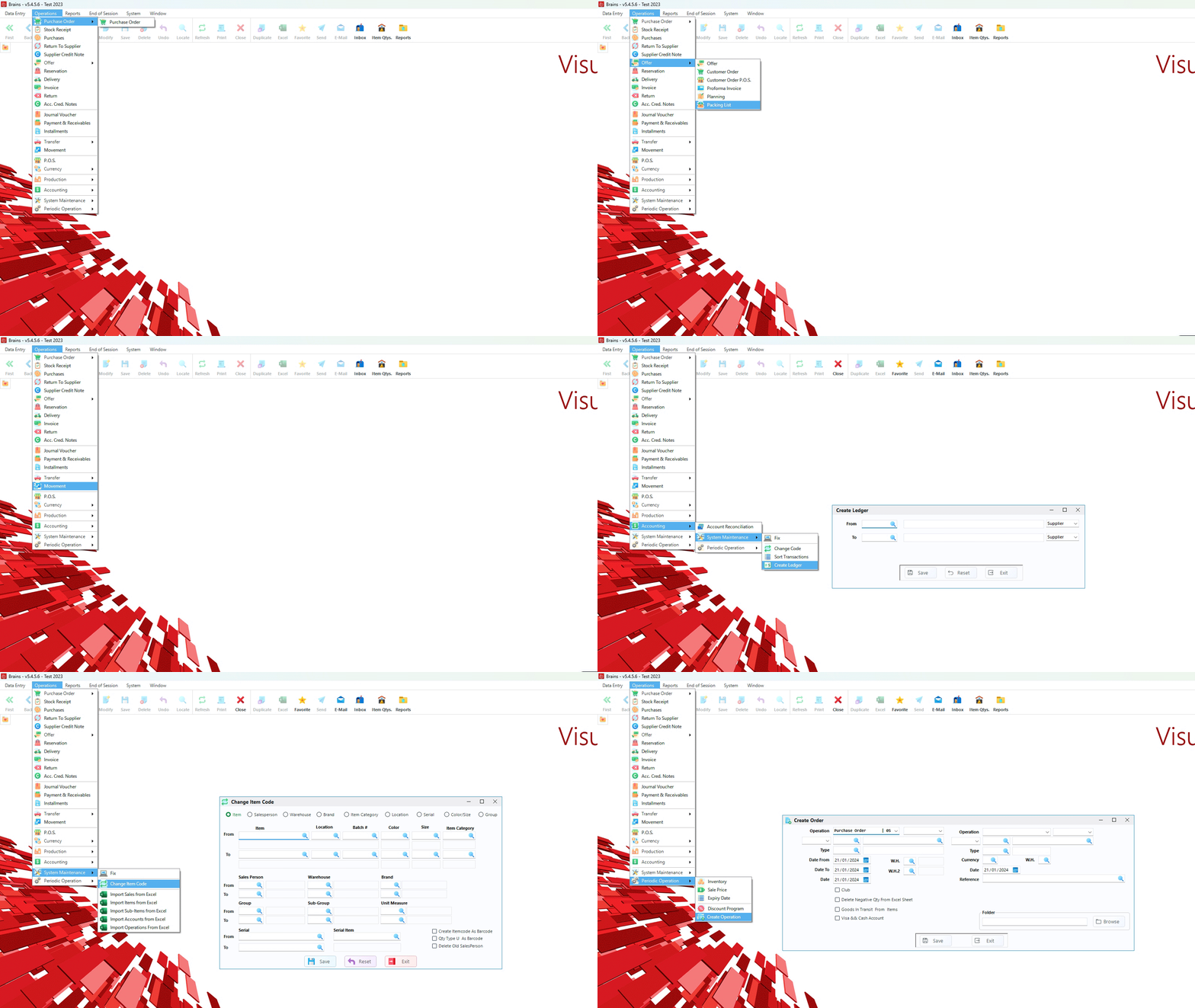
Manage daily exchange rates for accurate multi-currency transactions
Create and compare computer orders with supplier invoices
Record quantities and prices with automatic weighted average cost calculation
Generate computerized offers based on customer requirements
Create delivery notes and reserve inventory quantities
Issue sales invoices for goods and services
Manage returned goods and inventory adjustments
View real-time remaining quantities per warehouse for specific items
Display multiple cost metrics (ex-factory, last cost, weighted average) in various currencies
Generate cash receipts and payment vouchers for customers and suppliers
Group items into kits and automatically calculate new costs, or disassemble them
Reconcile physical stock with system records through plus/minus adjustments
Generate and print flat and non-flat rate installment plans
Comprehensive financial reporting and analysis tools
See how to generate comprehensive financial
reports
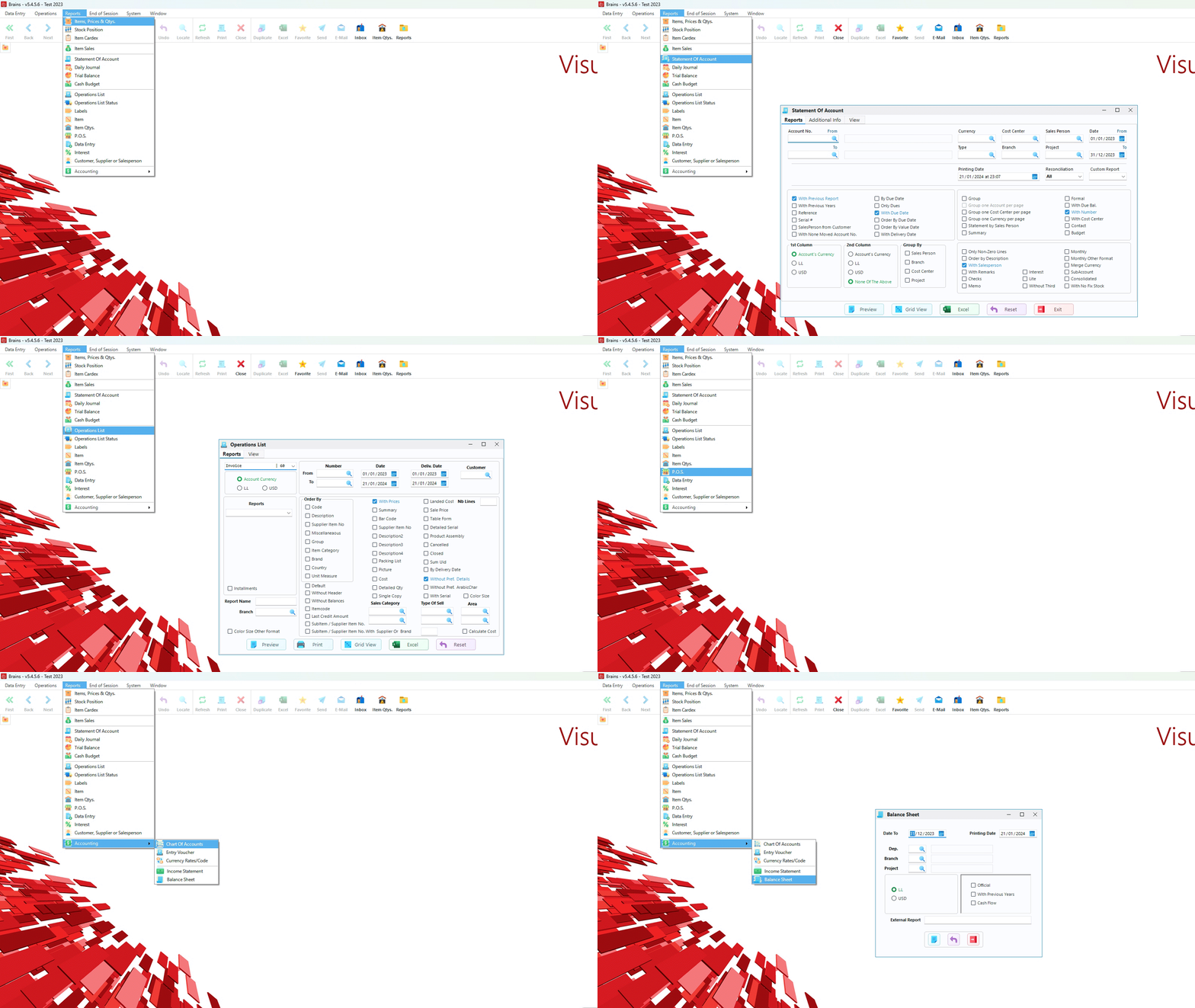
Track quantities and values with starting balance, incoming/outgoing stock, and final balance between dates
Analyze client turnover with sales values, returns, and net balance per customer
Monitor salesperson turnover and performance metrics across all transactions
Track monthly sales targets set by marketing against actual performance per salesperson
Generate comprehensive reports of all stock quantities and values up to any given date
View stock quantity values filtered by specific supplier or supplier groups
Monthly and yearly sales analysis by item, client, salesperson, category, or custom combinations
Monitor client financial status and outstanding amounts owed to the company
Detailed report of invoices and returns per salesperson between selected dates
Complete listing of invoices and returns for each client within date ranges
Monitor all current and upcoming stock expiration dates for inventory management
Automatically calculate sales prices based on cost percentages (last cost or weighted average)
Total sales amount per client summarized between any two selected dates
Total sales performance per salesperson summarized between selected date ranges
End-of-session procedures and data protection features
See how to properly close sessions and backup
data
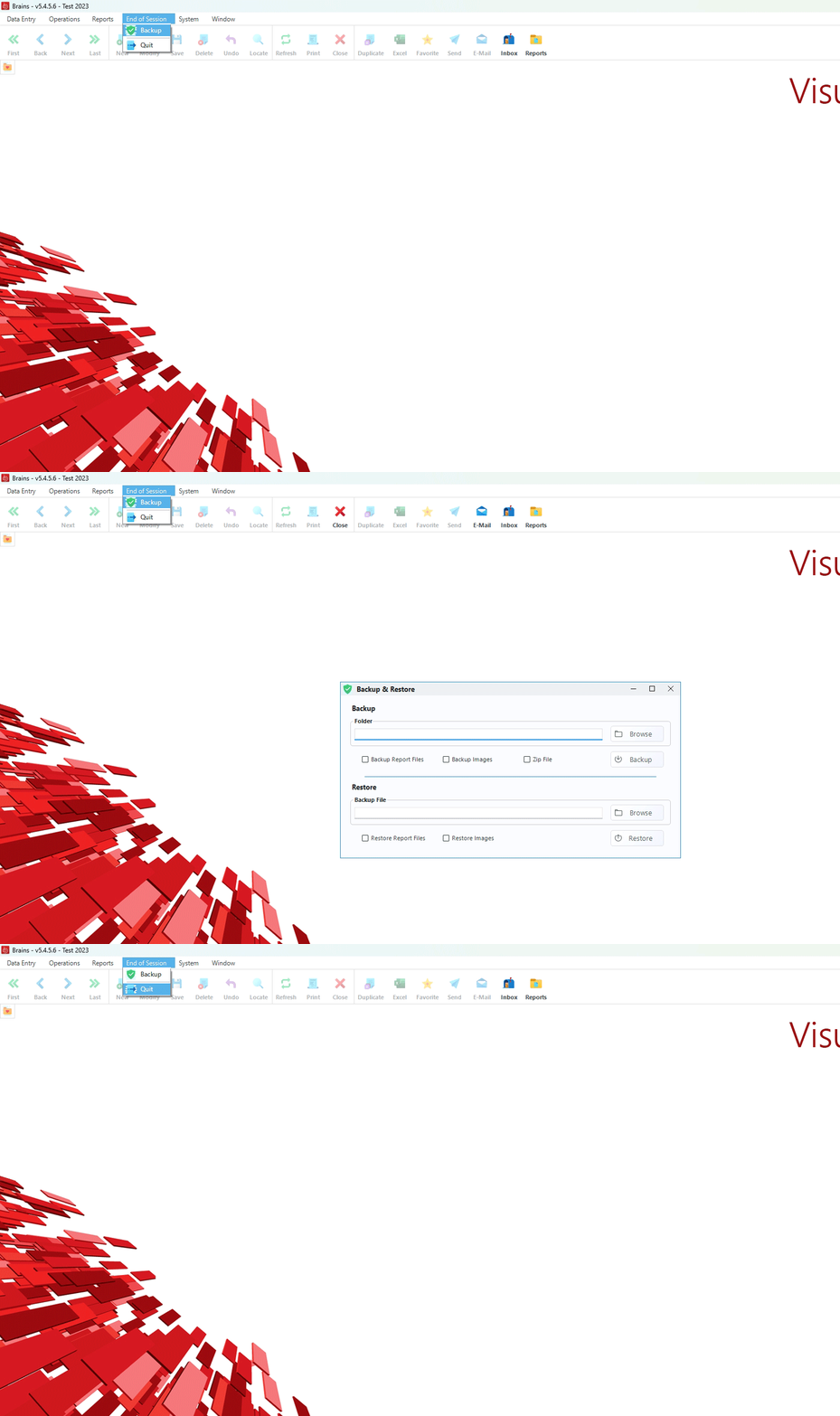
Secure your financial data with automated backup procedures that run directly from the system without requiring exit
Properly close Brains system with data integrity checks and automatic save procedures
Automatic validation ensures all transactions are properly recorded before session closure
Recover interrupted sessions with complete transaction history intact
Optional cloud backup integration for additional data protection
Regular auto-save functionality prevents data loss during extended sessions
Perform regular backups to protect against data loss. The system allows backup operations without interrupting workflow.
Review completed transactions and verify data integrity before closing the session.
Close the system with confidence knowing all data is properly saved and secured.
Advanced system settings and customization options
See how to customize system settings and manage
companies
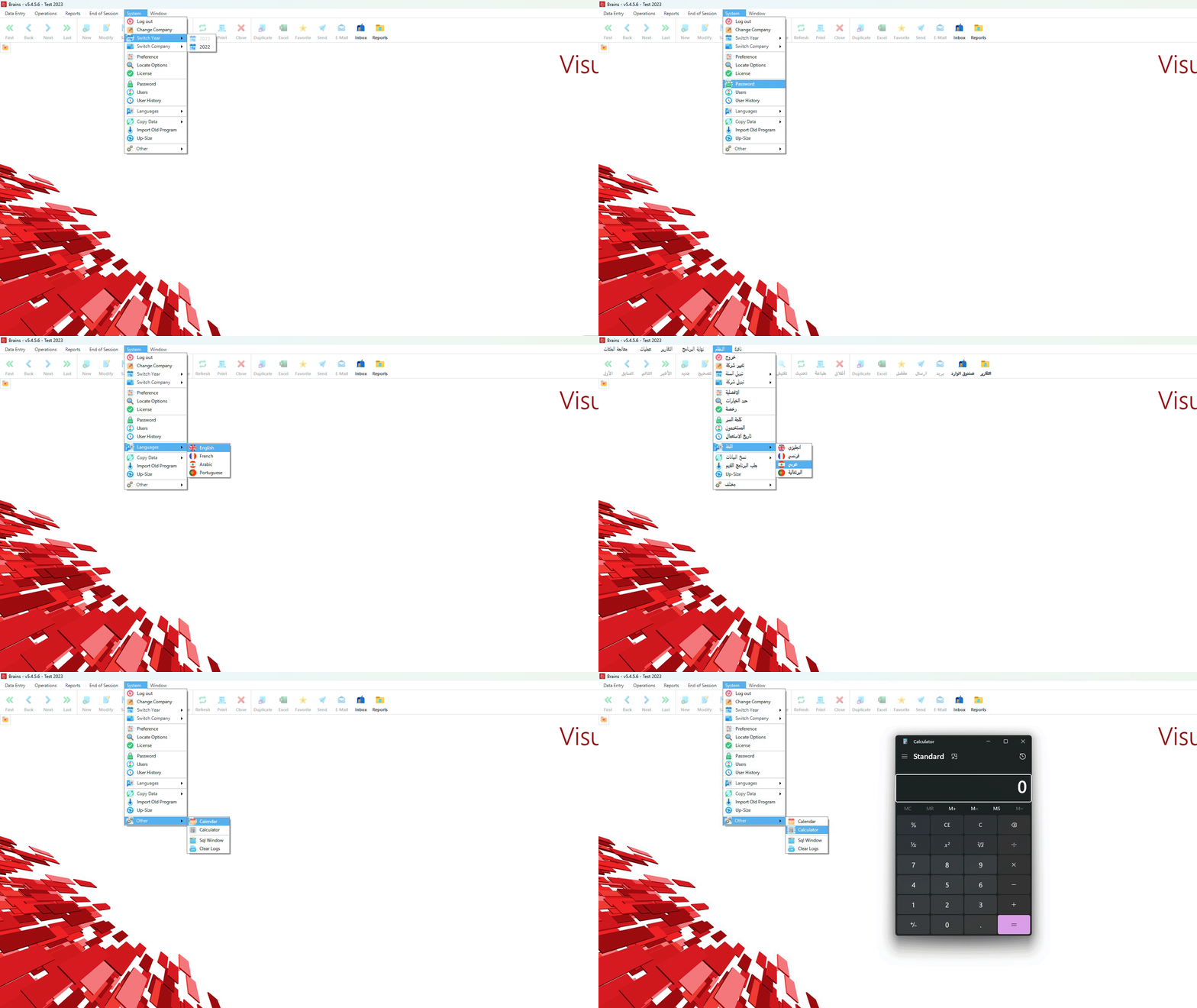
Seamlessly switch between different companies while maintaining separate financial records and configurations
Comprehensive user access control with customizable permissions and security settings
Full interface localization in Arabic, French, English, and Portuguese languages
Change system passwords with advanced security options and encryption
Choose to list auxiliary accounts by code or description for optimal organization
Switch between supported languages without restarting the application
Automatically number daily journal pages for government submission and stamping
Access calculator and calendar functions directly within the application
Instant switching between companies with automatic file management
Built to handle growing business needs with unlimited user support and data capacity
Enterprise-grade security with comprehensive access controls and audit capabilities
Designed to meet regulatory requirements with built-in compliance features
Robust SQL Server integration with optimized performance and reliability
Multi-user network deployment with centralized data management
Real-time data synchronization across multiple company databases